


9 Cybersecurity solutions for real estate (2026 Edition)
Compare the top cybersecurity tools for title, escrow, and closing teams, including email security, MFA, training platforms, and CertifID's wire fraud protection.
Share article:


.png)
Katie Stewart
Cybersecurity
Jul 16, 2026
Jul 16, 2026
Quick summary
Real estate buyers and sellers face wire fraud, BEC, and seller impersonation daily. General cybersecurity tools like email filters, password managers, and training reduce overall exposure. But none verify wire instructions or ensure against loss. CertifID is the closing-specific layer: identity-verified wires, automated payoff verification, and up to $5M in underwritten insurance per transaction.
Three tools worth knowing first:
The rest of this guide breaks down all nine, beginning with the layer built specifically for real estate closings.
Closing teams are a top BEC target
Closing day moves fast, and fraudsters know it.
A spoofed email with new wiring instructions can drain a buyer's life savings in minutes.
The FBI's IC3 ranks BEC as the second-largest cyber-loss category, with $3 billion in reported losses in 2025. Real estate fraud specifically accounted for $275 million of that year's losses, up from $173 million in 2024 (CertifID 2024 State of Wire Fraud Report)
AI-generated phishing attempts and deepfakes have made it harder to spot fake emails.
This guide explores nine cybersecurity tools you can use to protect your real estate firm, starting with the one built for closings.
Why listen to us?
We founded CertifID as title professionals who survived a Black Axe-linked BEC attack. That history shapes how we built our platform: not as a generic security add-on, but as a closing-specific response to the fraud patterns that teams face every day. We have verified 1.46 million wires, preventing roughly $2 billion in fraud.
What is cybersecurity software, in a title office context?
Cybersecurity software protects email, endpoints, and credentials from phishing, malware, and account takeover.
For closing teams, the stakes go further.
A compromised inbox does not just leak data. It can trigger a fraudulent wire that closes a file straight into a criminal’s account. General security tools reduce the odds of compromise. But they do not verify who is actually receiving a wire. Most were not built with closing workflows, payoff statements, or underwriter audits in mind.
They’re designed to stop generic threats, not the specific financial trigger point that makes real estate closings so attractive to fraudsters.
9 Cybersecurity solutions for real estate compared
Now, let’s give a detailed review of the solutions.
1. CertifID
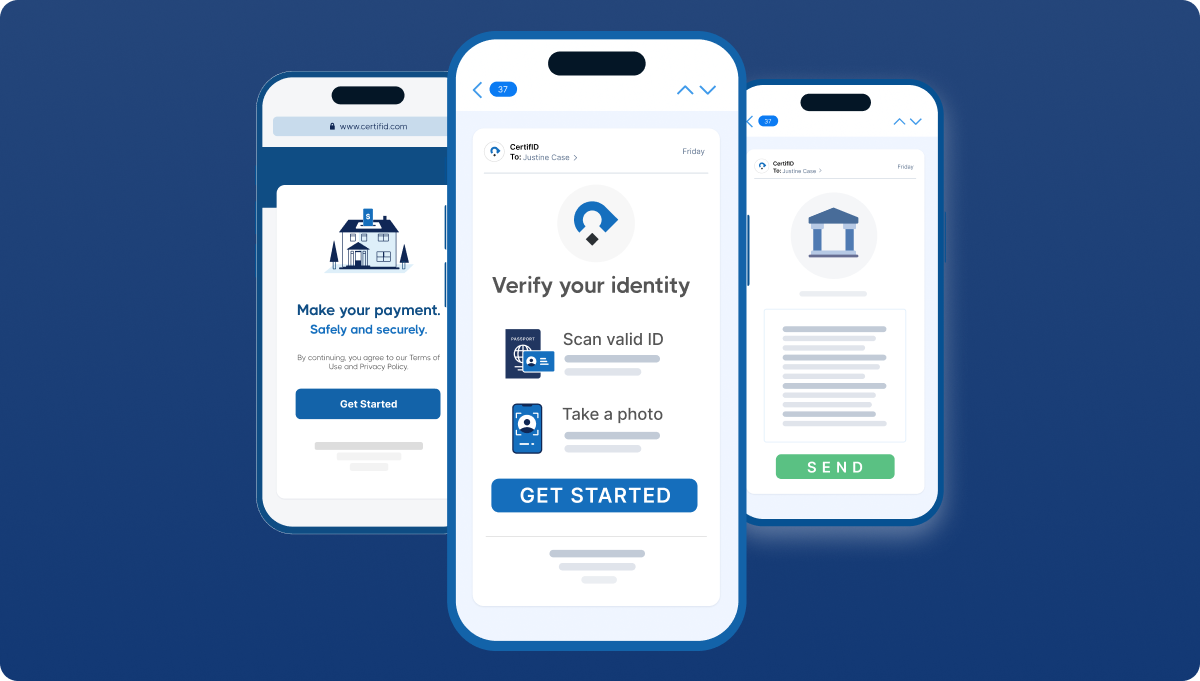
Unlike generalist solutions, we built CertifID specifically for real estate closings.
Our platform verifies the identity and bank account of every wire recipient before funds are transferred, replacing manual callbacks that fraudsters routinely exploit. PayoffProtect extends that verification to mortgage payoff statements.
We also offer the deepest title-software integrations in the category, offering comprehensive protection and real estate-specific workflows.
Key features
- Identity Verification: Identity and bank verification before every wire, using barcode analysis and facial recognition
- Digital Payments: Receive payments like earnest money deposits and cash to close
- PayoffProtect: Automated payoff verification with insurance attached
- Insurance: Up to $5M insurance per wire and payoff backed by Lloyd's of London
- Title-software Integrations: Deep, native integrations with SoftPro, Qualia/Resware, and RamQuest
Pricing
Custom quote-based
Core strength
Designed specifically to prevent and recover from closing and wire fraud in real estate
Biggest con
- Does not support or protect person-to-person (P2P) transfers
Best for
Title agencies, escrow firms, and real estate law firms needing verified, insured wire protection for closings
G2 rating
4.8/5 (144+ reviews)
2. KnowBe4
.png)
KnowBe4 trains employees to spot phishing and BEC before they click, using simulated campaigns and a risk-scoring dashboard. Its Always-on agents (AIDA) detect risky behaviors in real time. This promptness matters because most wire fraud starts with a human clicking the wrong link, not a network breach.
Key features
- Phishing Protection: Phishing simulations with AI deepfake-aware modules
- Risk Score Dashboard: Alerts you to risky or secure behaviors
- Multi-Language Support: 34+ language library for extensive localization
- PhishER: Flags potentially malicious emails reported by your employees
Pricing
Custom, by seat count
Core strength
Excellent reporting for ALTA compliance
Biggest con
- Doesn't stop a wire once an employee is fooled
Best for
Security awareness training and phishing defense
G2 rating
4.6/5 (2,375+ reviews)
3. Coro Cybersecurity
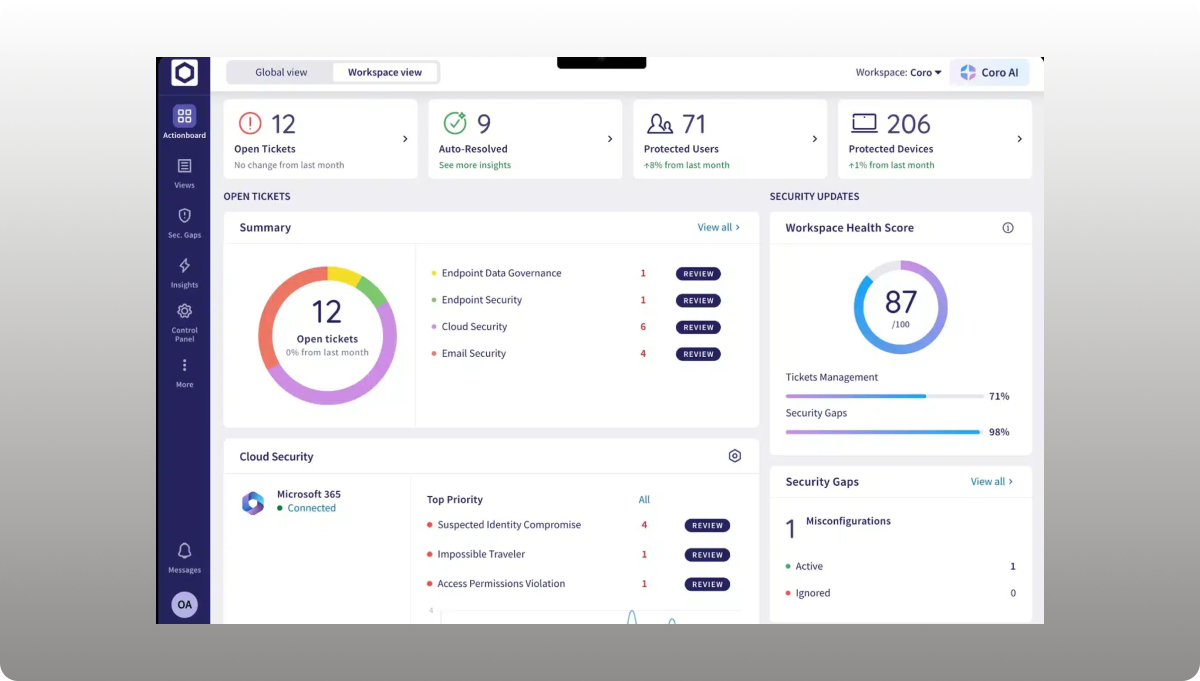
Coro bundles email, endpoint, and cloud app security into a single dashboard for lean IT teams, with sensible defaults rather than deep configuration. It reduces the odds that a fraudulent email ever reaches a closer’s inbox.
Key features
- Endpoint Protection: Next-gen antivirus, endpoint detection and response (EDR)
- Email Security: Scans and quarantines phishing attempts
- Automated Remediation: Coro's AI automatically classifies and blocks threats
- Unified Platform: Merges endpoint, email, cloud apps, identity, network, and data protection.
Pricing
Tailored quote based on your needs
Core strength
- Replaces fragmented security stacks with one unified platform
Biggest con
- Limited customization options
Best for
Small title or escrow offices without in-house IT.
G2 rating
4.7/5 (231+ reviews)
4. Microsoft Defender for Office 365
.png)
For Microsoft 365 shops, Defender natively adds phishing defense and anti-impersonation policies, as well as newer LLM-based intent analysis for BEC. It helps reduce risk, though detection of payload-free social engineering still lags behind dedicated behavioral tools.
Key Features
- Anti-Phishing Protection: Blocks targeted spear phishing and BEC attacks
- Safe Links: Verifies URLs and blocks access to malicious websites.
- Collaboration Protection: Protects SharePoint, OneDrive, and Microsoft Teams files against malicious uploads.
- Attack Simulation Training: Enables admins to run phishing simulations
Pricing
Starts from ~$2.00/user/month
Core strength
- Strong Microsoft ecosystem integration
Biggest con
- Limited protection outside Microsoft apps
Best for
Microsoft 365-native firms wanting built-in protection
G2 rating
4.5/5 (297+reviews)
5. Keeper Security
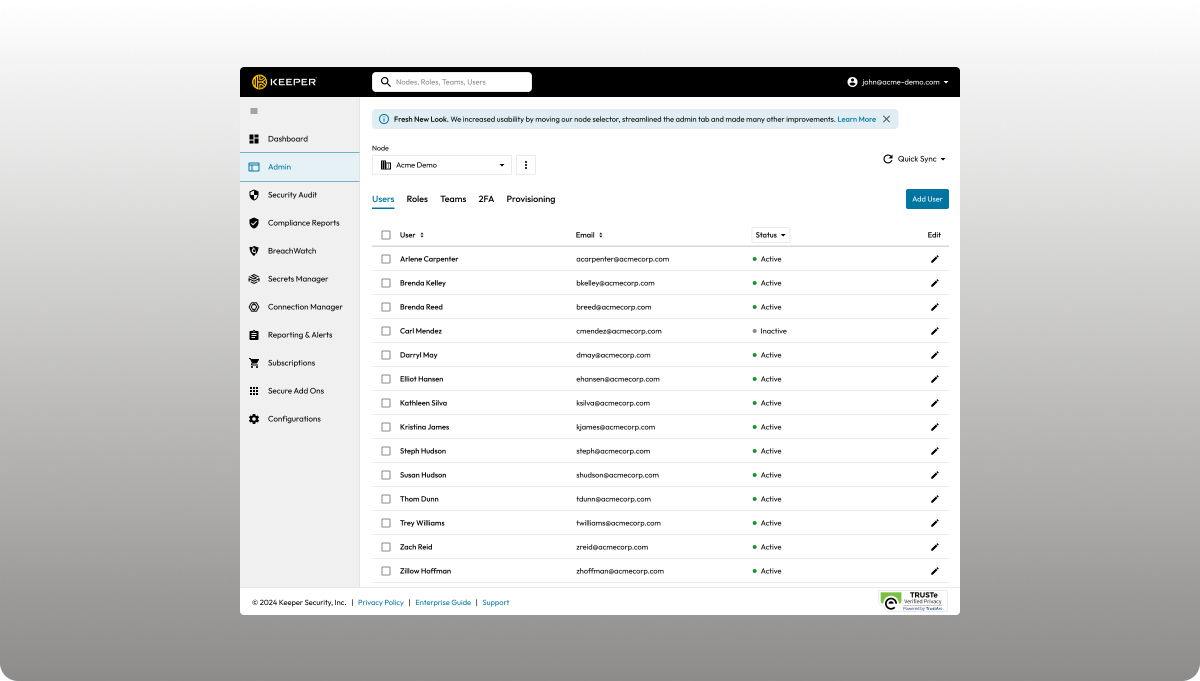
Weak or reused passwords are a common path to account takeover, which can lead straight to a spoofed wire instruction. Keeper centralizes credentials with zero-knowledge encryption and flags weak or reused shared logins, filling a frequent gap during acquisitions or seasonal hiring.
Key features
- Zero-knowledge Encryption: Data encrypted/decrypted locally on the user’s device
- Role-based Access: Define user permissions and administrative capabilities
- Integration: Azure AD/Okta/Microsoft 365 integration
- Biometric Login: Unlocks your vault via Face ID, Touch ID, and Windows Hello
Pricing
Starts from ~$2.00/user/month
Core strength
Unmatched credential protection with quantum‑resistant encryption
Biggest con
Dark Web monitoring (Breach Watch) and file storage are sold as separate paid add-ons
Best for
Offices managing shared logins across closing software, banks, and underwriter systems.
G2 rating
4.6/5 (1252+ reviews)
6. Mimecast Advanced Email Security
.png)
Mimecast reinspects mail after Microsoft 365’s native filtering, catching phishing and impersonation attempts that slip through the first layer. It also bundles archiving and continuity features that help with compliance and retention. But it can be too complex for smaller firms than lighter solutions.
Key features
- AI Threat Detection: Uses behavioral analysis to detect emerging threats
- Display Name Spoofing: Checks if incoming email display names match the names of internal users
- Cloud Email Archiving: Secures and archives encrypted data
- DMARC Analyzer: Gives organizations visibility into who is sending email on behalf of their domain
Pricing
Custom, by mailbox count
Core strength
- Catches what passes native filtering
Biggest con
- Insider threat protection can be expensive for small firms
Best for
Microsoft 365 firms wanting a second AI-driven filter behind native protection
G2 rating
4.3/5 (470 reviews)
7. Material Security
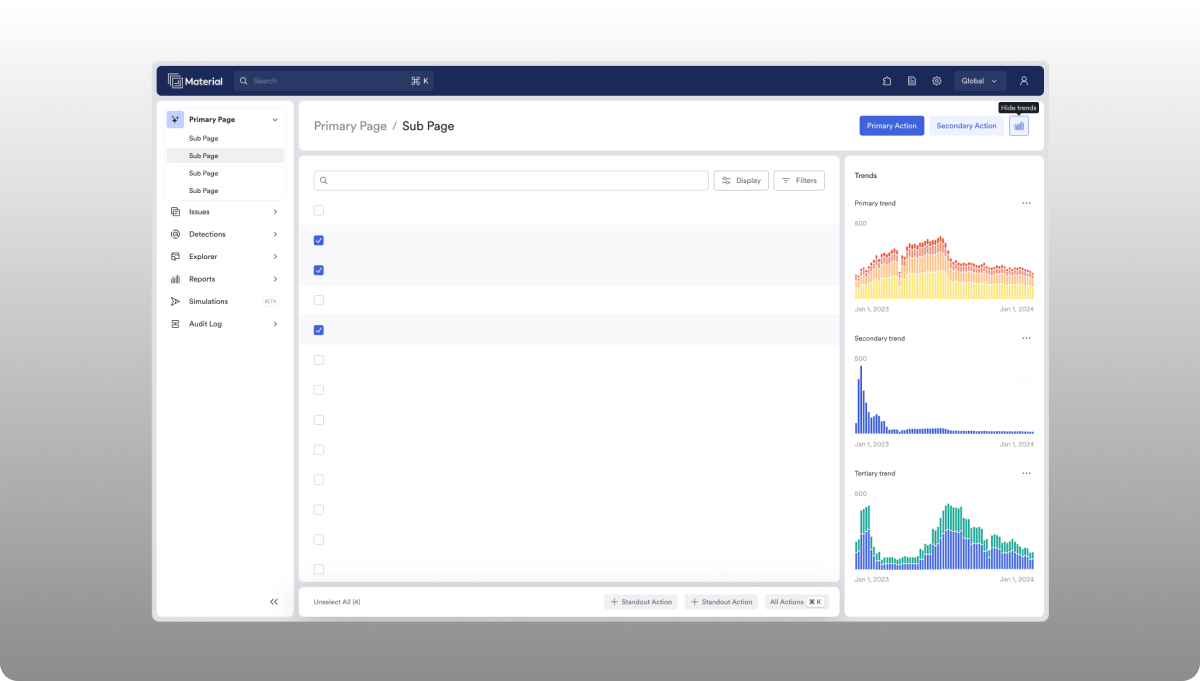
Most BEC losses occur after an account has already been compromised, and Material Security focuses on that gap. It locks down sensitive mailbox content and slows an attacker’s ability to search old emails, including prior wiring instructions, after a breach.
Key features
- Post-compromise account takeover detection
- Message-level controls after breach
- MFA gap detection
- Google Workspace and Microsoft 365 native integration
Pricing
Custom, by seat count
Core strength
- Strong focus on limiting post-breach damage
Biggest con
- Not widely used outside the Google Workspace or Microsoft 365 ecosystem
Best for
- Firms wanting a post-compromise safety net behind their main email tool
G2 rating
4.9/5 (23 reviews—small sample)
8. Cisco Duo
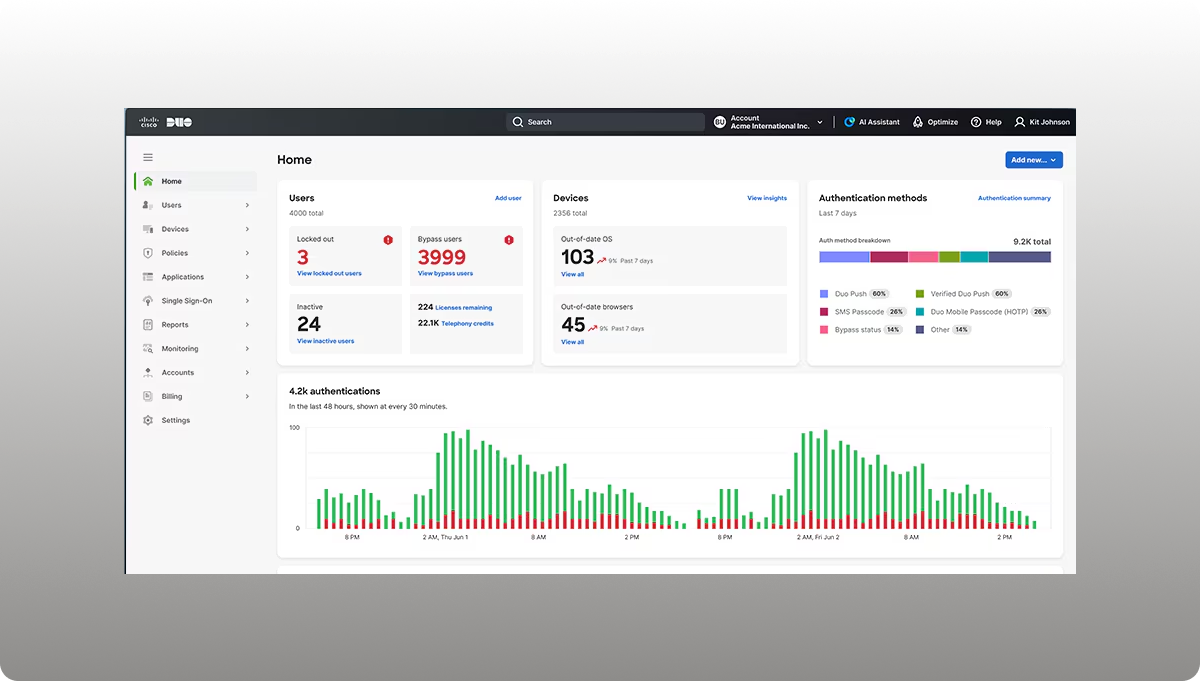
Cisco Duo adds MFA and device trust to every login, since a single compromised password can lead straight to a spoofed wire. It checks device health before granting access across VPNs, Microsoft 365, and cloud apps thus ensuring protection.
Key features
- Phishing‑Resistant MFA: Push notifications, biometrics, and security keys prevent credential theft.
- Device Trust and Health Checks: Analyzes the security posture of user devices
- Single Sign-On (SSO): Enables SSO across VPNs and cloud apps
- Adaptive Access: Enables IT admins to set granular, risk-based access rules
Pricing
Starts at $3.00/user/month
Core strength
- Strong multi-factor authentication (MFA) that often satisfies cyber insurance requirements
Biggest con
Costs add up for very small offices
Best for
Locking down logins to closing software and banking portals.
G2 rating
4.5/5 (517+ reviews)
9. EasyDMARC
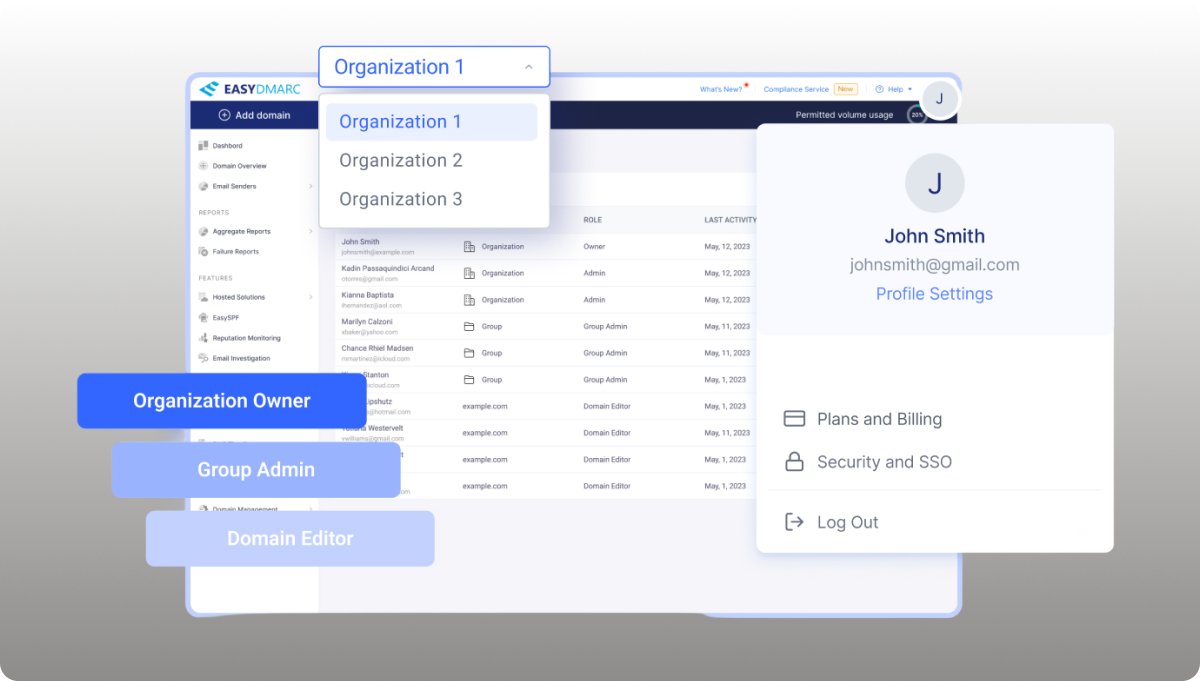
Most BEC and seller-impersonation scams work because a spoofed domain looks close enough to the real one. EasyDMARC monitors and enforces SPF, DKIM, and DMARC so fraudsters can't easily send mail that appears to come from your own domain.
Key features
- Threat Protection: Detects and mitigates phishing, spoofing, and unauthorized senders
- AI-Based Data Classification: Helps distinguish legitimate senders from malicious IPs
- Device Health Monitoring: Ensures endpoints meet compliance before connecting
- Alert Manager: Prompt alerts for suspicious sending spikes
Pricing
Starts from ~$35.99/month
Core strength
- Prevents domain spoofing used in impersonation scams
Biggest con
Pricing climbs with domain count
Best for
Firms wanting to stop their domain from being spoofed in fraudulent instructions.
G2 rating
4.7/5 (223+ reviews)
Why title and escrow teams need more than generic security tools
While general tools offer protection from cyber attacks, it’s often not enough because:
- Standard antivirus and spam filters don't catch socially engineered emails with no malware payload, since there's nothing technically malicious to flag
- Manual phone callback verification is easily defeated by spoofed numbers and doesn't scale across a busy closing calendar
- Cyber and E&O policies often exclude or cap social-engineering wire losses, leaving firms exposed even after paying for coverage
- Underwriters and ALTA Best Practices increasingly require documented wire-verification controls, not just generic IT security
- Acquired branches and growing firms often run mismatched security stacks, which complicates audits and widens the attack surface
Choosing the right cybersecurity mix for your closing team
No single tool here covers every risk, so think of these as three layers working together rather than competing options.
Layer #1: Stops threats at the door
Coro, Microsoft Defender, or Mimecast filter phishing and malicious attachments before they ever land in an inbox. This is your first and broadest line of defense.
Layer #2: Protect your people and accounts
KnowBe4 trains staff to spot what slips through the filter. Keeper and Cisco Duo lock down logins so a stolen password doesn't become a stolen wire. Even well-trained staff click the wrong link occasionally. So this layer assumes some threats will get through and limits the damage.
Layer #3: Protects the transaction itself
EasyDMARC and Material Security guard your domain and inbox even after something goes wrong. CertifID verifies and insures the actual money movement, the one piece none of the others touch.
Here's a simple way to think about where to start, based on where your firm is today:
- Solo shop, no dedicated IT staff: Start with Coro or native Microsoft 365 protection for broad email coverage, add KnowBe4 so staff can recognize what gets through, and layer CertifID on top for the wire itself. This combination covers the most common attack paths without requiring a security team to manage it.
- Growing firm with multiple branches: Add Keeper or Cisco Duo for credential control across locations, and EasyDMARC to lock down your domain before fraudsters spoof it in seller-impersonation scams. Standardizing these tools across newly acquired branches also simplifies ALTA audits.
- Already breached once or recently audited: Material Security and Mimecast add a second line of defense behind your existing setup, catching what your first layer missed and limiting the damage a compromised account can cause.
Whatever combination fits your firm, CertifID isn't optional. It's the only tool here that ensures the money, not just the inbox. This is the difference that matters most when a wire actually goes out the door.
Protect the closing, not just the inbox
Undoubtedly, general cybersecurity solutions lower your odds of a breach. But they don't verify who's actually receiving a wire, and they don't insure the funds if fraud gets through anyway.
That gap is exactly where most closing-fraud losses happen. Breaches don't occur because a firm has no security tools. They happen because none of those tools were built to verify the one thing that’s crucial at closing. The identity of the person on the other end of the wire. CertifID closes that gap directly, with up to $5M in underwritten coverage per transaction.
Talk to our team about adding a closing-specific protection layer to your existing security stack.
FAQ
Does cybersecurity software stop wire fraud in real estate closings?

General tools reduce the chance that a phishing email reaches an inbox. But they don’t verify wire recipients or ensure the funds are sent, which is why closing-specific tools like CertifID matter.
What's the difference between email security and wire verification?
Email security filters malicious messages before they're read. Wire verification confirms the identity and bank account of the actual recipient, regardless of how convincing the email looked.
Does CertifID replace antivirus or email security tools?
No. CertifID is a closing-specific layer for wire, payofsf, and identity verification, working alongside general email and endpoint security.
How much insurance coverage does CertifID provide?
Up to $5 million in underwritten insurance per verified wire and per verified payoff, backed by an A-rated carrier rather than a capped marketing guarantee.
What should a title office do in the first 24 hours after a wire fraud incident?
Contact the receiving bank immediately to request a wire recall, then notify law enforcement and file a report with the FBI's IC3. CertifID's recovery team works with the U.S. Secret Service and has helped recover over $100 million for victims.

VP of Customer Success

Katie's background combines both IT and education. Her degree is in Management Information Systems, and she spent her first four years in the workforce as an IT business analyst. Katie took a career turn and joined Teach for America and worked in inner-city schools in Indianapolis as a math teacher and eventually an assistant principal. Today she combines her IT nerdiness and love of teaching, helping customers find success every day.
Quick summary
Real estate buyers and sellers face wire fraud, BEC, and seller impersonation daily. General cybersecurity tools like email filters, password managers, and training reduce overall exposure. But none verify wire instructions or ensure against loss. CertifID is the closing-specific layer: identity-verified wires, automated payoff verification, and up to $5M in underwritten insurance per transaction.
Three tools worth knowing first:
The rest of this guide breaks down all nine, beginning with the layer built specifically for real estate closings.
Closing teams are a top BEC target
Closing day moves fast, and fraudsters know it.
A spoofed email with new wiring instructions can drain a buyer's life savings in minutes.
The FBI's IC3 ranks BEC as the second-largest cyber-loss category, with $3 billion in reported losses in 2025. Real estate fraud specifically accounted for $275 million of that year's losses, up from $173 million in 2024 (CertifID 2024 State of Wire Fraud Report)
AI-generated phishing attempts and deepfakes have made it harder to spot fake emails.
This guide explores nine cybersecurity tools you can use to protect your real estate firm, starting with the one built for closings.
Why listen to us?
We founded CertifID as title professionals who survived a Black Axe-linked BEC attack. That history shapes how we built our platform: not as a generic security add-on, but as a closing-specific response to the fraud patterns that teams face every day. We have verified 1.46 million wires, preventing roughly $2 billion in fraud.
What is cybersecurity software, in a title office context?
Cybersecurity software protects email, endpoints, and credentials from phishing, malware, and account takeover.
For closing teams, the stakes go further.
A compromised inbox does not just leak data. It can trigger a fraudulent wire that closes a file straight into a criminal’s account. General security tools reduce the odds of compromise. But they do not verify who is actually receiving a wire. Most were not built with closing workflows, payoff statements, or underwriter audits in mind.
They’re designed to stop generic threats, not the specific financial trigger point that makes real estate closings so attractive to fraudsters.
9 Cybersecurity solutions for real estate compared
Now, let’s give a detailed review of the solutions.
1. CertifID
Unlike generalist solutions, we built CertifID specifically for real estate closings.
Our platform verifies the identity and bank account of every wire recipient before funds are transferred, replacing manual callbacks that fraudsters routinely exploit. PayoffProtect extends that verification to mortgage payoff statements.
We also offer the deepest title-software integrations in the category, offering comprehensive protection and real estate-specific workflows.
Key features
- Identity Verification: Identity and bank verification before every wire, using barcode analysis and facial recognition
- Digital Payments: Receive payments like earnest money deposits and cash to close
- PayoffProtect: Automated payoff verification with insurance attached
- Insurance: Up to $5M insurance per wire and payoff backed by Lloyd's of London
- Title-software Integrations: Deep, native integrations with SoftPro, Qualia/Resware, and RamQuest
Pricing
Custom quote-based
Core strength
Designed specifically to prevent and recover from closing and wire fraud in real estate
Biggest con
- Does not support or protect person-to-person (P2P) transfers
Best for
Title agencies, escrow firms, and real estate law firms needing verified, insured wire protection for closings
G2 rating
4.8/5 (144+ reviews)
2. KnowBe4
KnowBe4 trains employees to spot phishing and BEC before they click, using simulated campaigns and a risk-scoring dashboard. Its Always-on agents (AIDA) detect risky behaviors in real time. This promptness matters because most wire fraud starts with a human clicking the wrong link, not a network breach.
Key features
- Phishing Protection: Phishing simulations with AI deepfake-aware modules
- Risk Score Dashboard: Alerts you to risky or secure behaviors
- Multi-Language Support: 34+ language library for extensive localization
- PhishER: Flags potentially malicious emails reported by your employees
Pricing
Custom, by seat count
Core strength
Excellent reporting for ALTA compliance
Biggest con
- Doesn't stop a wire once an employee is fooled
Best for
Security awareness training and phishing defense
G2 rating
4.6/5 (2,375+ reviews)
3. Coro Cybersecurity
Coro bundles email, endpoint, and cloud app security into a single dashboard for lean IT teams, with sensible defaults rather than deep configuration. It reduces the odds that a fraudulent email ever reaches a closer’s inbox.
Key features
- Endpoint Protection: Next-gen antivirus, endpoint detection and response (EDR)
- Email Security: Scans and quarantines phishing attempts
- Automated Remediation: Coro's AI automatically classifies and blocks threats
- Unified Platform: Merges endpoint, email, cloud apps, identity, network, and data protection.
Pricing
Tailored quote based on your needs
Core strength
- Replaces fragmented security stacks with one unified platform
Biggest con
- Limited customization options
Best for
Small title or escrow offices without in-house IT.
G2 rating
4.7/5 (231+ reviews)
4. Microsoft Defender for Office 365
For Microsoft 365 shops, Defender natively adds phishing defense and anti-impersonation policies, as well as newer LLM-based intent analysis for BEC. It helps reduce risk, though detection of payload-free social engineering still lags behind dedicated behavioral tools.
Key Features
- Anti-Phishing Protection: Blocks targeted spear phishing and BEC attacks
- Safe Links: Verifies URLs and blocks access to malicious websites.
- Collaboration Protection: Protects SharePoint, OneDrive, and Microsoft Teams files against malicious uploads.
- Attack Simulation Training: Enables admins to run phishing simulations
Pricing
Starts from ~$2.00/user/month
Core strength
- Strong Microsoft ecosystem integration
Biggest con
- Limited protection outside Microsoft apps
Best for
Microsoft 365-native firms wanting built-in protection
G2 rating
4.5/5 (297+reviews)
5. Keeper Security
Weak or reused passwords are a common path to account takeover, which can lead straight to a spoofed wire instruction. Keeper centralizes credentials with zero-knowledge encryption and flags weak or reused shared logins, filling a frequent gap during acquisitions or seasonal hiring.
Key features
- Zero-knowledge Encryption: Data encrypted/decrypted locally on the user’s device
- Role-based Access: Define user permissions and administrative capabilities
- Integration: Azure AD/Okta/Microsoft 365 integration
- Biometric Login: Unlocks your vault via Face ID, Touch ID, and Windows Hello
Pricing
Starts from ~$2.00/user/month
Core strength
Unmatched credential protection with quantum‑resistant encryption
Biggest con
Dark Web monitoring (Breach Watch) and file storage are sold as separate paid add-ons
Best for
Offices managing shared logins across closing software, banks, and underwriter systems.
G2 rating
4.6/5 (1252+ reviews)
6. Mimecast Advanced Email Security
Mimecast reinspects mail after Microsoft 365’s native filtering, catching phishing and impersonation attempts that slip through the first layer. It also bundles archiving and continuity features that help with compliance and retention. But it can be too complex for smaller firms than lighter solutions.
Key features
- AI Threat Detection: Uses behavioral analysis to detect emerging threats
- Display Name Spoofing: Checks if incoming email display names match the names of internal users
- Cloud Email Archiving: Secures and archives encrypted data
- DMARC Analyzer: Gives organizations visibility into who is sending email on behalf of their domain
Pricing
Custom, by mailbox count
Core strength
- Catches what passes native filtering
Biggest con
- Insider threat protection can be expensive for small firms
Best for
Microsoft 365 firms wanting a second AI-driven filter behind native protection
G2 rating
4.3/5 (470 reviews)
7. Material Security
Most BEC losses occur after an account has already been compromised, and Material Security focuses on that gap. It locks down sensitive mailbox content and slows an attacker’s ability to search old emails, including prior wiring instructions, after a breach.
Key features
- Post-compromise account takeover detection
- Message-level controls after breach
- MFA gap detection
- Google Workspace and Microsoft 365 native integration
Pricing
Custom, by seat count
Core strength
- Strong focus on limiting post-breach damage
Biggest con
- Not widely used outside the Google Workspace or Microsoft 365 ecosystem
Best for
- Firms wanting a post-compromise safety net behind their main email tool
G2 rating
4.9/5 (23 reviews—small sample)
8. Cisco Duo
Cisco Duo adds MFA and device trust to every login, since a single compromised password can lead straight to a spoofed wire. It checks device health before granting access across VPNs, Microsoft 365, and cloud apps thus ensuring protection.
Key features
- Phishing‑Resistant MFA: Push notifications, biometrics, and security keys prevent credential theft.
- Device Trust and Health Checks: Analyzes the security posture of user devices
- Single Sign-On (SSO): Enables SSO across VPNs and cloud apps
- Adaptive Access: Enables IT admins to set granular, risk-based access rules
Pricing
Starts at $3.00/user/month
Core strength
- Strong multi-factor authentication (MFA) that often satisfies cyber insurance requirements
Biggest con
Costs add up for very small offices
Best for
Locking down logins to closing software and banking portals.
G2 rating
4.5/5 (517+ reviews)
9. EasyDMARC
Most BEC and seller-impersonation scams work because a spoofed domain looks close enough to the real one. EasyDMARC monitors and enforces SPF, DKIM, and DMARC so fraudsters can't easily send mail that appears to come from your own domain.
Key features
- Threat Protection: Detects and mitigates phishing, spoofing, and unauthorized senders
- AI-Based Data Classification: Helps distinguish legitimate senders from malicious IPs
- Device Health Monitoring: Ensures endpoints meet compliance before connecting
- Alert Manager: Prompt alerts for suspicious sending spikes
Pricing
Starts from ~$35.99/month
Core strength
- Prevents domain spoofing used in impersonation scams
Biggest con
Pricing climbs with domain count
Best for
Firms wanting to stop their domain from being spoofed in fraudulent instructions.
G2 rating
4.7/5 (223+ reviews)
Why title and escrow teams need more than generic security tools
While general tools offer protection from cyber attacks, it’s often not enough because:
- Standard antivirus and spam filters don't catch socially engineered emails with no malware payload, since there's nothing technically malicious to flag
- Manual phone callback verification is easily defeated by spoofed numbers and doesn't scale across a busy closing calendar
- Cyber and E&O policies often exclude or cap social-engineering wire losses, leaving firms exposed even after paying for coverage
- Underwriters and ALTA Best Practices increasingly require documented wire-verification controls, not just generic IT security
- Acquired branches and growing firms often run mismatched security stacks, which complicates audits and widens the attack surface
Choosing the right cybersecurity mix for your closing team
No single tool here covers every risk, so think of these as three layers working together rather than competing options.
Layer #1: Stops threats at the door
Coro, Microsoft Defender, or Mimecast filter phishing and malicious attachments before they ever land in an inbox. This is your first and broadest line of defense.
Layer #2: Protect your people and accounts
KnowBe4 trains staff to spot what slips through the filter. Keeper and Cisco Duo lock down logins so a stolen password doesn't become a stolen wire. Even well-trained staff click the wrong link occasionally. So this layer assumes some threats will get through and limits the damage.
Layer #3: Protects the transaction itself
EasyDMARC and Material Security guard your domain and inbox even after something goes wrong. CertifID verifies and insures the actual money movement, the one piece none of the others touch.
Here's a simple way to think about where to start, based on where your firm is today:
- Solo shop, no dedicated IT staff: Start with Coro or native Microsoft 365 protection for broad email coverage, add KnowBe4 so staff can recognize what gets through, and layer CertifID on top for the wire itself. This combination covers the most common attack paths without requiring a security team to manage it.
- Growing firm with multiple branches: Add Keeper or Cisco Duo for credential control across locations, and EasyDMARC to lock down your domain before fraudsters spoof it in seller-impersonation scams. Standardizing these tools across newly acquired branches also simplifies ALTA audits.
- Already breached once or recently audited: Material Security and Mimecast add a second line of defense behind your existing setup, catching what your first layer missed and limiting the damage a compromised account can cause.
Whatever combination fits your firm, CertifID isn't optional. It's the only tool here that ensures the money, not just the inbox. This is the difference that matters most when a wire actually goes out the door.
Protect the closing, not just the inbox
Undoubtedly, general cybersecurity solutions lower your odds of a breach. But they don't verify who's actually receiving a wire, and they don't insure the funds if fraud gets through anyway.
That gap is exactly where most closing-fraud losses happen. Breaches don't occur because a firm has no security tools. They happen because none of those tools were built to verify the one thing that’s crucial at closing. The identity of the person on the other end of the wire. CertifID closes that gap directly, with up to $5M in underwritten coverage per transaction.
Talk to our team about adding a closing-specific protection layer to your existing security stack.
VP of Customer Success
Katie's background combines both IT and education. Her degree is in Management Information Systems, and she spent her first four years in the workforce as an IT business analyst. Katie took a career turn and joined Teach for America and worked in inner-city schools in Indianapolis as a math teacher and eventually an assistant principal. Today she combines her IT nerdiness and love of teaching, helping customers find success every day.
Sign up for The Wire to join the conversation.




Austin
3601 South Congress Ave.
Ste D200, Austin, Texas 78704

Grand Rapids
124 Fulton Street E
Grand Rapids, MI 49503

