


Wire transfer verification: How to eliminate the risk of fraud
Learn how to keep your transactions safe from wire fraud.
Share article:


.png)
Luis Palomares
6 minutes
Fraud Prevention
Dec 17, 2024
Aug 13, 2026
Wire fraud is a growing threat, with the FBI reporting over 859,532 complaints of suspected internet crime, exceeding $16 billion in 2024.
As ALTA CEO Diane Tomb warns, "Fraud attempts are increasing compared to a year ago, meaning title and settlement companies must be even more vigilant."
According to our data, 17% of title companies sent money to an incorrect account due to fraud last year, with seller net proceeds theft averaging $172,080 per incident. Half of those companies experienced fraud more than once.
These losses are preventable with the right payoff verification procedures in place. Wire transfer verification systems verify a recipient's identity and validate their bank account details before any funds move. It closes the one opening fraudsters exploit most often at closing.
Key takeaways:
- Why traditional verification methods (callbacks, email confirmations) fail against modern fraud
- How to safely collect wire instructions from sellers with multi-factor verification
- The exact process to confirm wire instructions before disbursing closing funds
- Best practices for compliance, team training, and wire fraud insurance
By following these protocols, you'll safeguard your clients' funds while protecting your company's reputation.
The traditional way to verify wire instructions (and why it fails)
For decades, professionals have relied on the same manual verification methods. Here's how the traditional process works and where it breaks down:
Step 1: Receive payoff wire instructions via email
Your client emails their banking information. The problem? Email is the easiest target for fraudsters. They intercept messages, change account numbers, and send modified instructions that look identical to the original.
Step 2: Stop and locate a trusted phone number
You know better than to call the number in the email, so you search for a verified contact. You check the client's website, dig through old communications, or hunt down a business card. This takes time, and you're still not certain the number you found is legitimate.
Step 3: Call to verify the details
You call and ask the person to read back the entire instruction set: account name, bank, routing number, and account number.
But here's the risk—if fraudsters have compromised the client's communications, they're already intercepting your calls. You might be speaking to an impersonator who sounds professional and has all the right answers.
Step 4: Send a test wire
For large amounts, you send $1 first and wait for confirmation. This adds delays to your closing timeline and still doesn't guarantee the recipient is legitimate.
Manual wire transfer verification is still the default at most title companies, and it’s easy to see why: feels thorough, methodical, like real due diligence. But it only catches the mistakes fraudsters weren't careful enough to hide, and today’s fraudsters are careful.
Why this process puts you at risk:
- Email interception happens in seconds, often before you realize communications are compromised
- Callback verification fails when fraudsters control phone systems through spoofing or forwarding
- You remain liable for misdirected funds even when you follow these steps
- The process takes 20+ minutes per verification and creates delays at closing
- There's no audit trail showing you performed due diligence
But there is a safer way to verify wiring instructions.
How to safely collect wire instructions with CertifID Confirm
Typical use case: Requesting seller proceeds information
You're handling a $450,000 home sale closing. Before disbursing seller proceeds, you need their banking information. This is one of the highest-risk moments — fraudsters know sellers expect large wire transfers and often impersonate them to redirect funds.
Here's how CertifID's Collect eliminates that exposure:
Step 1: The recipient receives your verification request
.png)
CertifID sends the account holder an email and text message requesting confirmation. The email clearly states what's being verified and why.
The recipient sees an explanation: they need to securely confirm their bank details, and CertifID will verify their identity before confirming the banking information. This protects both parties from fraud.
Step 2: Device validation begins
When the recipient clicks the link, they see a personalized greeting with a clear explanation of what's happening. The system begins device validation with a loading screen showing "Securing connection..."
The platform checks for suspicious locations, VPN usage, and other fraud indicators automatically. The recipient then sees what to expect:
- Validate your device (using multi-factor authentication)
- Verify your identity (security questions)
- Confirm bank details (for the transaction)
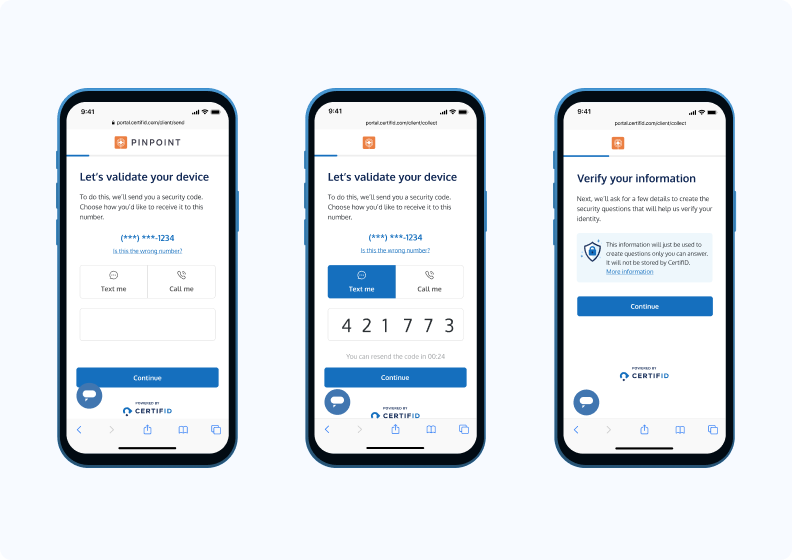
Step 3: Phone verification
The system sends a security code to the recipient's verified phone number. They can choose to receive it via text or call. After entering the 6-digit code, they continue to the next step.
This confirms the person accessing the link controls the phone number associated with the account.
Step 4: Personal details entry
The recipient enters the address information they've lived at for at least 3 months:
- Address line 1
- Apartment, suite, etc. (optional)
- City
- State
- Zip code
The system explains: "This information will just be used to create questions only you can answer. It will not be stored by CertifID."
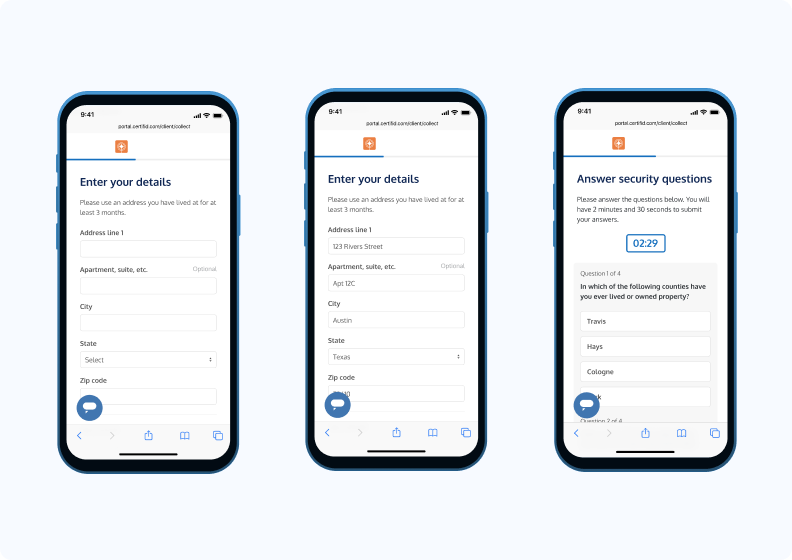
Step 5: Security questions
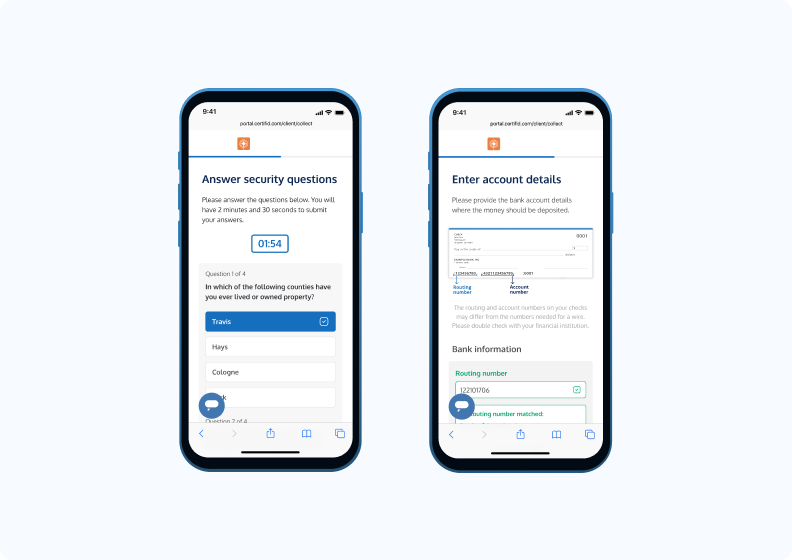
The recipient answers credit-based security questions with a 2-minute, 30-second timer. Example question: "In which of the following counties have you ever lived or owned property?"
They work through questions pulled from their credit history—information only the legitimate account holder would know. This creates a verification barrier fraudsters can't easily overcome.
Step 6: Review account details
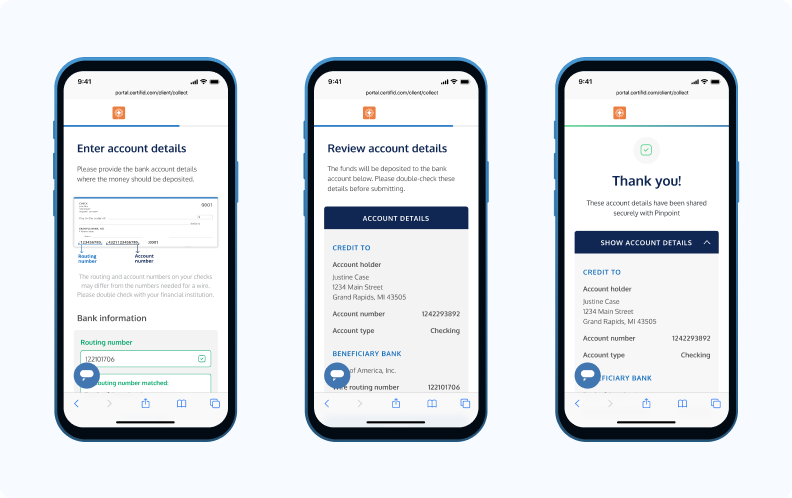
The recipient enters their banking information, starting with their routing number. The system validates the routing number in real-time, displaying "Routing number matched!" with a green checkmark when verified.
They see a helpful note: "The routing and account numbers on your checks may differ from the numbers needed for a wire. Please double-check with your financial institution."
The screen prompts: "The funds will be deposited to the bank account below. Please double-check these details before submitting."
Step 7: Confirmation and documentation
Once approved, the success screen displays: "Thank you! These account details have been shared securely with Pinpoint."
The recipient can expand "SHOW ACCOUNT DETAILS" to view the complete confirmation, which includes:
CREDIT TO
- Complete account holder information
- Full account number
- Account type
BENEFICIARY BANK
- Bank name and wire routing number
Both you and the recipient receive a PDF confirmation showing complete account details, property address, and beneficiary bank information with full routing and account numbers.
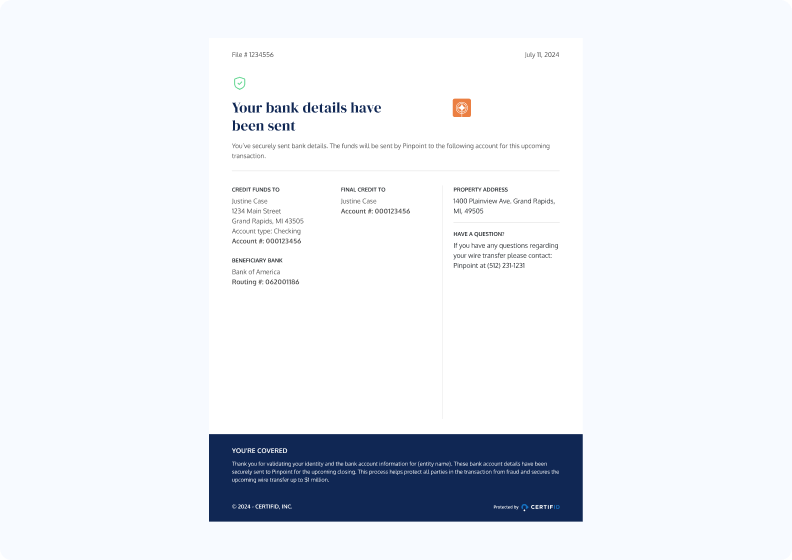
The document includes insurance coverage details: "You're covered. Thank you for verifying your identity and the bank account information. These bank account details have been reviewed and will be used for the transaction."
What you receive: You get instant confirmation in your CertifID dashboard showing the recipient verified their identity and approved the banking details. You have documented proof that:
- Device validation passed
- Phone number verified
- Identity confirmed through security questions
- Banking details reviewed and approved by the authorized account holder
The transaction is backed by up to $5 million in direct insurance per file. Every step is documented, creating a complete audit trail for compliance.
How to confirm wire instructions with CertifID Confirm
Typical use case: Verifying account details before disbursing closing funds
You're three days from closing on a $650,000 purchase. The buyer's attorney emails wire instructions for where to send the remaining proceeds after the mortgage payoff. Everything looks right—law firm letterhead, attorney's signature, proper account details.
But here's the risk: according to State of Wire Fraud, 17% of title companies sent money to an incorrect account due to fraud last year, and half of those experienced it more than once.
Business Email Compromise scams specifically target these final wire transfers, knowing you're working under tight closing deadlines.
Step 1: The recipient receives your verification request
When you input the wire instructions into CertifID, the system sends an email and text to the account holder requesting confirmation. The email clearly states what's being verified and why.
.png)
The recipient sees a personalized greeting with an explanation: they need to securely confirm their bank details, and CertifID will verify their identity before confirming the banking information. This protects both parties from fraud.
The message includes a note from your closing team requesting they submit their bank account information. This provides context and establishes legitimacy.
Step 2: What to expect next
.png)
When the recipient clicks "Get Started," they see a preview of the three-step process:
- Validate your device: Using multi-factor authentication
- Verify your identity: Through security questions
- Confirm bank details: For the transaction
The system begins device validation with a loading screen. The platform checks for suspicious locations, VPN usage, and other fraud indicators automatically.
Step 3: Phone verification
The system displays the recipient's masked phone number and asks how they'd like to receive a security code—via text or call.
After they select their preference, a 6-digit code is sent. They enter the code and continue. This confirms the person accessing the link controls the phone number associated with the account.
Step 4: Personal details entry
The recipient enters address information they've lived at for at least 3 months:
- Address line 1
- Apartment, suite, etc. (optional)
- City
- State
- Zip code
The system explains: "This information will just be used to create questions only you can answer. It will not be stored by CertifID."
Step 5: Security questions
The recipient answers credit-based security questions with a 2-minute, 30-second timer. Example question: "In which of the following counties have you ever lived or owned property?"
They work through 4 questions pulled from their credit history—information only the legitimate account holder would know. This creates a verification barrier fraudsters can't easily overcome.
Step 6: Review and approve account details
.png)
The recipient sees the complete banking information you entered:
ACCOUNT DETAILS
CREDIT TO
- Account holder name
- Account number
BENEFICIARY BANK
- Bank name
- Wire routing number
A confirmation dialog appears: "Are these account details correct? By approving, you are authorizing the use of these account details to receive funds."
This is your critical safeguard. If a fraudster has intercepted the attorney's email and changed account numbers, the real account holder will immediately identify the discrepancy and reject the details. You'll know before closing that you need updated instructions.
Step 7: Confirmation and documentation
.png)
Once approved, the system displays: "Thank you! These account details have been approved securely."
Both you and the recipient receive a PDF confirmation showing:
- Complete account details
- Property address
- Beneficiary bank information
- Full routing and account numbers
Now let's look at best practices for preventing wire fraud at your title company.
Best practices for preventing wire transfer fraud
Avoiding fraud is easy when you know what to look out for. A strong wire transfer verification program isn't a single platform or one closing protection step. It's compliance, training, technology, and insurance working together, and missing any one piece puts more weight on the others than they can carry.
1. Stick to compliance requirements
ALTA's Best Practices Framework (Version 3.0) outlines key requirements for title companies to protect against wire fraud.
Here are the key requirements directly from ALTA's Pillar 2 - "Adopt and maintain appropriate written procedures and controls for Escrow Trust Accounts":
Written procedures: According to ALTA's Best Practice 2.01, maintain documented procedures for escrow trust accounts, including:
- Wire and funds transfer controls
- Positive pay or ACH blocks
- Segregation of duties
- Daily reconciliation procedures
Escrow account protection: Under Best Practice 2.02, title companies must:
- Maintain separate escrow/trust accounts
- Perform three-way reconciliation (bank statement, book balance, trial balance)
- Document and resolve outstanding file balances
Wire transfer security: Best Practice 2.04 requires:
- Secure authorization and authentication procedures
- Training on wire fraud prevention
- Documentation of all verification steps
- Regular review of domestic wire transfer procedures
For the most current compliance requirements, always check ALTA’s best practice website. They update requirements periodically to address emerging fraud threats.
2. Educate and train your team
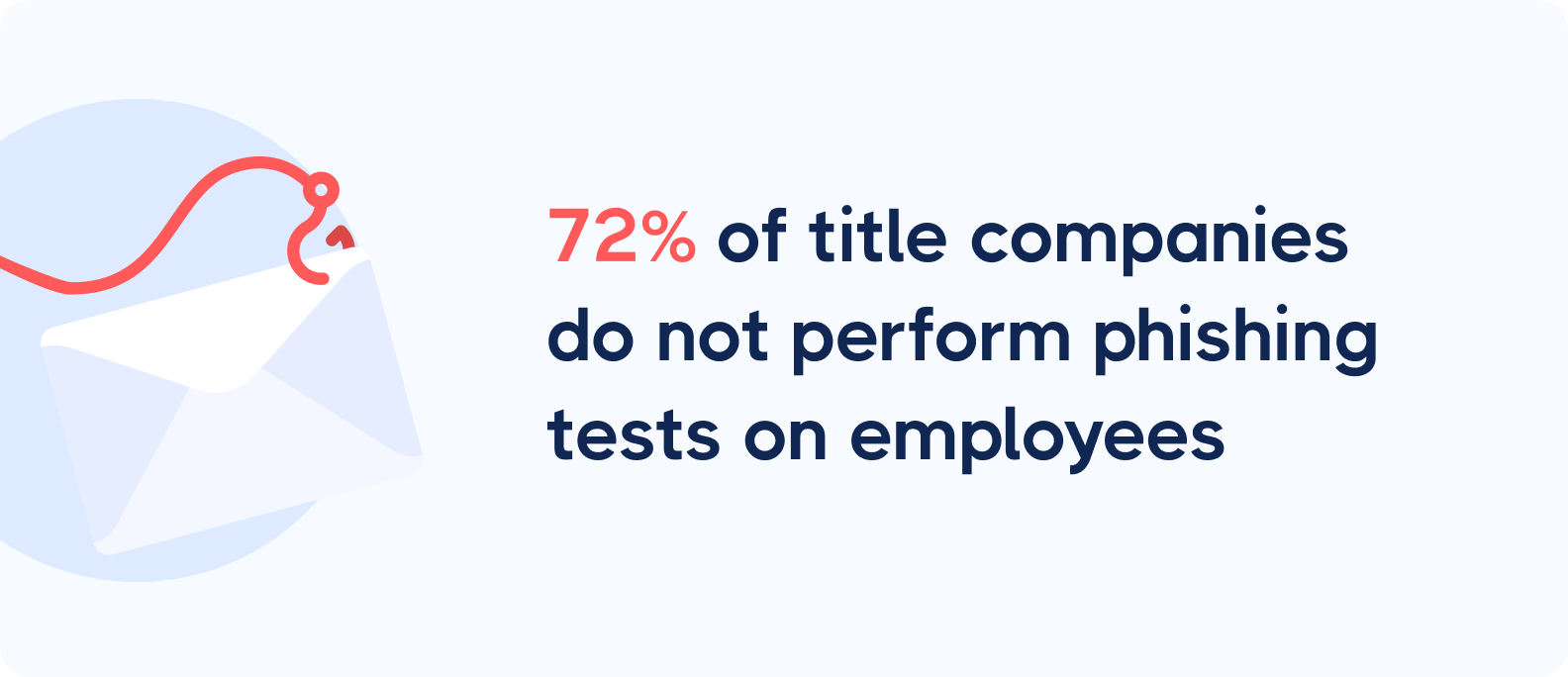
Title companies face unique fraud risks. With large wire transfers happening daily, a single mistake can be catastrophic, yet 72% of title companies don't conduct phishing tests on their employees.
Use real-world examples in training. Show your team actual fraud attempts targeting title companies—how fraudsters impersonated lenders, intercepted communications, and redirected mortgage payoffs.
Walk through each case: what warning signs were missed, and what verification steps could have prevented the loss?
Run regular simulations. Test how your staff handles wire instruction changes, urgent payoff requests, or suspicious lender communications. These exercises build muscle memory for the following verification procedures under pressure.
Remember: Every team member who touches a wire transfer must understand that verification means protection for your company and your clients.
3. Stay updated on fraud tactics
New fraud methods pop up all the time thanks to new technological advances and sophisticated software.
The technology and stories around cybercrime and wire fraud can be quite fascinating.
One of the latest tactics is “vishing,” which sees fraudsters faking a caller ID, playing office sounds in the background, and posing as someone from a company.
Learn more about it in this short video:
If you’d like to stay up to date with cybersecurity updates and fraud prevention news, sign up for our newsletter.

4. Avoid email reliance and callbacks
Wire fraud schemes target two key points in your transaction process:
- Wire instruction collection
- Mortgage payoff verification
Let's look at why traditional methods put your business at risk.
Email is often the default way to receive wire instructions, despite being highly vulnerable to fraud. Criminals have become experts at intercepting these emails and altering payment details for seller proceeds.
For mortgage payoffs, many title agencies still rely on callbacks. While this might seem secure, it creates the following risks:
- Fraudsters who've compromised communications can intercept these verification calls
- Lender representatives might accidentally confirm incorrect financial information
- Your company remains liable for any misdirected funds
The solution? Secure, multi-layered verification platforms protect both types of transactions. This gives you confidence that funds reach their intended destinations—whether you're sending seller proceeds or mortgage payoffs.
5. Get solid wire fraud insurance
As a title professional, you need a safety net even with robust security measures. Wire fraud insurance provides extra protection when scams slip through your defenses.
Traditional cyber insurance policies don't always cover wire fraud losses. Look for coverage designed for real estate companies, including protection against fraudulent wire transfers and social engineering scams.
The best insurance providers understand the unique risks of real estate transactions and offer quick response times—because with wire fraud, timing is critical.
Consider how your insurance and verification tools work together. The combination of prevention and protection will help you ultimately keep your customers and business safe.
Let CertifID verify your wiring instructions
Now you know exactly how to verify wiring instructions. Don't let wire fraud put your company at risk. With the right tools and procedures, you can protect your transactions and maintain your reputation.
Consistent wire transfer verification, applied to every file regardless of size, turns a one-time fix into a lasting standard.
Ready to see how automated verification can protect your business?

FAQ
What should I do if I receive wire instructions on Friday afternoon before a Monday closing?

Follow the same verification procedures regardless of timing. If verification can't be completed, delay the wire transfer. Fraudsters exploit closing pressure and tight deadlines to bypass security protocols.
How do we handle wire instruction changes submitted less than 24 hours before closing?
Treat last-minute changes as high-risk. Reverify the account holder's identity through multiple channels, document the reason for the change, and consider delaying closing if verification cannot be completed satisfactorily.
Should we verify wiring instructions for every transaction or only high-value ones?
Verify every transaction. Fraudsters target transactions of all sizes, and inconsistent procedures create vulnerabilities. Staff may struggle to determine thresholds under pressure, leading to errors. Universal verification eliminates decision fatigue and ensures compliance.
What is wire transfer verification?
Wire transfer verification is the process of verifying a recipient's identity and validating their ownership of a bank account before funds are sent. It’s typically done through multi-factor authentication and knowledge-based questions, not a phone callback or email confirmation alone.
Does wire transfer verification slow down closing?
No. Automated verification through a platform like CertifID typically completes in minutes and runs alongside your existing closing workflow. Manual callback verification, by comparison, can take 20 or more minutes per file.
Is wire transfer verification required by ALTA Best Practices?
ALTA's Best Practices Framework doesn't mandate a specific vendor, but Pillar 2 requires documented wire transfer security procedures, including secure authorization, staff training, and verification documentation. Requirements manual callback processes struggle to satisfy consistently.

Director of Product

Luis brings over a decade of design and product leadership experience to the team. Before joining CertifID, Luis co-founded InHouse, a real estate marketing, and data platform. Today, he combines his passion for thoughtful design and his experience in real estate to help create a future safe from wire fraud.
Wire fraud is a growing threat, with the FBI reporting over 859,532 complaints of suspected internet crime, exceeding $16 billion in 2024.
As ALTA CEO Diane Tomb warns, "Fraud attempts are increasing compared to a year ago, meaning title and settlement companies must be even more vigilant."
According to our data, 17% of title companies sent money to an incorrect account due to fraud last year, with seller net proceeds theft averaging $172,080 per incident. Half of those companies experienced fraud more than once.
These losses are preventable with the right payoff verification procedures in place. Wire transfer verification systems verify a recipient's identity and validate their bank account details before any funds move. It closes the one opening fraudsters exploit most often at closing.
Key takeaways:
- Why traditional verification methods (callbacks, email confirmations) fail against modern fraud
- How to safely collect wire instructions from sellers with multi-factor verification
- The exact process to confirm wire instructions before disbursing closing funds
- Best practices for compliance, team training, and wire fraud insurance
By following these protocols, you'll safeguard your clients' funds while protecting your company's reputation.
The traditional way to verify wire instructions (and why it fails)
For decades, professionals have relied on the same manual verification methods. Here's how the traditional process works and where it breaks down:
Step 1: Receive payoff wire instructions via email
Your client emails their banking information. The problem? Email is the easiest target for fraudsters. They intercept messages, change account numbers, and send modified instructions that look identical to the original.
Step 2: Stop and locate a trusted phone number
You know better than to call the number in the email, so you search for a verified contact. You check the client's website, dig through old communications, or hunt down a business card. This takes time, and you're still not certain the number you found is legitimate.
Step 3: Call to verify the details
You call and ask the person to read back the entire instruction set: account name, bank, routing number, and account number.
But here's the risk—if fraudsters have compromised the client's communications, they're already intercepting your calls. You might be speaking to an impersonator who sounds professional and has all the right answers.
Step 4: Send a test wire
For large amounts, you send $1 first and wait for confirmation. This adds delays to your closing timeline and still doesn't guarantee the recipient is legitimate.
Manual wire transfer verification is still the default at most title companies, and it’s easy to see why: feels thorough, methodical, like real due diligence. But it only catches the mistakes fraudsters weren't careful enough to hide, and today’s fraudsters are careful.
Why this process puts you at risk:
- Email interception happens in seconds, often before you realize communications are compromised
- Callback verification fails when fraudsters control phone systems through spoofing or forwarding
- You remain liable for misdirected funds even when you follow these steps
- The process takes 20+ minutes per verification and creates delays at closing
- There's no audit trail showing you performed due diligence
But there is a safer way to verify wiring instructions.
How to safely collect wire instructions with CertifID Confirm
Typical use case: Requesting seller proceeds information
You're handling a $450,000 home sale closing. Before disbursing seller proceeds, you need their banking information. This is one of the highest-risk moments — fraudsters know sellers expect large wire transfers and often impersonate them to redirect funds.
Here's how CertifID's Collect eliminates that exposure:
Step 1: The recipient receives your verification request
CertifID sends the account holder an email and text message requesting confirmation. The email clearly states what's being verified and why.
The recipient sees an explanation: they need to securely confirm their bank details, and CertifID will verify their identity before confirming the banking information. This protects both parties from fraud.
Step 2: Device validation begins
When the recipient clicks the link, they see a personalized greeting with a clear explanation of what's happening. The system begins device validation with a loading screen showing "Securing connection..."
The platform checks for suspicious locations, VPN usage, and other fraud indicators automatically. The recipient then sees what to expect:
- Validate your device (using multi-factor authentication)
- Verify your identity (security questions)
- Confirm bank details (for the transaction)
Step 3: Phone verification
The system sends a security code to the recipient's verified phone number. They can choose to receive it via text or call. After entering the 6-digit code, they continue to the next step.
This confirms the person accessing the link controls the phone number associated with the account.
Step 4: Personal details entry
The recipient enters the address information they've lived at for at least 3 months:
- Address line 1
- Apartment, suite, etc. (optional)
- City
- State
- Zip code
The system explains: "This information will just be used to create questions only you can answer. It will not be stored by CertifID."
Step 5: Security questions
The recipient answers credit-based security questions with a 2-minute, 30-second timer. Example question: "In which of the following counties have you ever lived or owned property?"
They work through questions pulled from their credit history—information only the legitimate account holder would know. This creates a verification barrier fraudsters can't easily overcome.
Step 6: Review account details
The recipient enters their banking information, starting with their routing number. The system validates the routing number in real-time, displaying "Routing number matched!" with a green checkmark when verified.
They see a helpful note: "The routing and account numbers on your checks may differ from the numbers needed for a wire. Please double-check with your financial institution."
The screen prompts: "The funds will be deposited to the bank account below. Please double-check these details before submitting."
Step 7: Confirmation and documentation
Once approved, the success screen displays: "Thank you! These account details have been shared securely with Pinpoint."
The recipient can expand "SHOW ACCOUNT DETAILS" to view the complete confirmation, which includes:
CREDIT TO
- Complete account holder information
- Full account number
- Account type
BENEFICIARY BANK
- Bank name and wire routing number
Both you and the recipient receive a PDF confirmation showing complete account details, property address, and beneficiary bank information with full routing and account numbers.
The document includes insurance coverage details: "You're covered. Thank you for verifying your identity and the bank account information. These bank account details have been reviewed and will be used for the transaction."
What you receive: You get instant confirmation in your CertifID dashboard showing the recipient verified their identity and approved the banking details. You have documented proof that:
- Device validation passed
- Phone number verified
- Identity confirmed through security questions
- Banking details reviewed and approved by the authorized account holder
The transaction is backed by up to $5 million in direct insurance per file. Every step is documented, creating a complete audit trail for compliance.
How to confirm wire instructions with CertifID Confirm
Typical use case: Verifying account details before disbursing closing funds
You're three days from closing on a $650,000 purchase. The buyer's attorney emails wire instructions for where to send the remaining proceeds after the mortgage payoff. Everything looks right—law firm letterhead, attorney's signature, proper account details.
But here's the risk: according to State of Wire Fraud, 17% of title companies sent money to an incorrect account due to fraud last year, and half of those experienced it more than once.
Business Email Compromise scams specifically target these final wire transfers, knowing you're working under tight closing deadlines.
Step 1: The recipient receives your verification request
When you input the wire instructions into CertifID, the system sends an email and text to the account holder requesting confirmation. The email clearly states what's being verified and why.
The recipient sees a personalized greeting with an explanation: they need to securely confirm their bank details, and CertifID will verify their identity before confirming the banking information. This protects both parties from fraud.
The message includes a note from your closing team requesting they submit their bank account information. This provides context and establishes legitimacy.
Step 2: What to expect next
When the recipient clicks "Get Started," they see a preview of the three-step process:
- Validate your device: Using multi-factor authentication
- Verify your identity: Through security questions
- Confirm bank details: For the transaction
The system begins device validation with a loading screen. The platform checks for suspicious locations, VPN usage, and other fraud indicators automatically.
Step 3: Phone verification
The system displays the recipient's masked phone number and asks how they'd like to receive a security code—via text or call.
After they select their preference, a 6-digit code is sent. They enter the code and continue. This confirms the person accessing the link controls the phone number associated with the account.
Step 4: Personal details entry
The recipient enters address information they've lived at for at least 3 months:
- Address line 1
- Apartment, suite, etc. (optional)
- City
- State
- Zip code
The system explains: "This information will just be used to create questions only you can answer. It will not be stored by CertifID."
Step 5: Security questions
The recipient answers credit-based security questions with a 2-minute, 30-second timer. Example question: "In which of the following counties have you ever lived or owned property?"
They work through 4 questions pulled from their credit history—information only the legitimate account holder would know. This creates a verification barrier fraudsters can't easily overcome.
Step 6: Review and approve account details
The recipient sees the complete banking information you entered:
ACCOUNT DETAILS
CREDIT TO
- Account holder name
- Account number
BENEFICIARY BANK
- Bank name
- Wire routing number
A confirmation dialog appears: "Are these account details correct? By approving, you are authorizing the use of these account details to receive funds."
This is your critical safeguard. If a fraudster has intercepted the attorney's email and changed account numbers, the real account holder will immediately identify the discrepancy and reject the details. You'll know before closing that you need updated instructions.
Step 7: Confirmation and documentation
Once approved, the system displays: "Thank you! These account details have been approved securely."
Both you and the recipient receive a PDF confirmation showing:
- Complete account details
- Property address
- Beneficiary bank information
- Full routing and account numbers
Now let's look at best practices for preventing wire fraud at your title company.
Best practices for preventing wire transfer fraud
Avoiding fraud is easy when you know what to look out for. A strong wire transfer verification program isn't a single platform or one closing protection step. It's compliance, training, technology, and insurance working together, and missing any one piece puts more weight on the others than they can carry.
1. Stick to compliance requirements
ALTA's Best Practices Framework (Version 3.0) outlines key requirements for title companies to protect against wire fraud.
Here are the key requirements directly from ALTA's Pillar 2 - "Adopt and maintain appropriate written procedures and controls for Escrow Trust Accounts":
Written procedures: According to ALTA's Best Practice 2.01, maintain documented procedures for escrow trust accounts, including:
- Wire and funds transfer controls
- Positive pay or ACH blocks
- Segregation of duties
- Daily reconciliation procedures
Escrow account protection: Under Best Practice 2.02, title companies must:
- Maintain separate escrow/trust accounts
- Perform three-way reconciliation (bank statement, book balance, trial balance)
- Document and resolve outstanding file balances
Wire transfer security: Best Practice 2.04 requires:
- Secure authorization and authentication procedures
- Training on wire fraud prevention
- Documentation of all verification steps
- Regular review of domestic wire transfer procedures
For the most current compliance requirements, always check ALTA’s best practice website. They update requirements periodically to address emerging fraud threats.
2. Educate and train your team
Title companies face unique fraud risks. With large wire transfers happening daily, a single mistake can be catastrophic, yet 72% of title companies don't conduct phishing tests on their employees.
Use real-world examples in training. Show your team actual fraud attempts targeting title companies—how fraudsters impersonated lenders, intercepted communications, and redirected mortgage payoffs.
Walk through each case: what warning signs were missed, and what verification steps could have prevented the loss?
Run regular simulations. Test how your staff handles wire instruction changes, urgent payoff requests, or suspicious lender communications. These exercises build muscle memory for the following verification procedures under pressure.
Remember: Every team member who touches a wire transfer must understand that verification means protection for your company and your clients.
3. Stay updated on fraud tactics
New fraud methods pop up all the time thanks to new technological advances and sophisticated software.
The technology and stories around cybercrime and wire fraud can be quite fascinating.
One of the latest tactics is “vishing,” which sees fraudsters faking a caller ID, playing office sounds in the background, and posing as someone from a company.
Learn more about it in this short video:
If you’d like to stay up to date with cybersecurity updates and fraud prevention news, sign up for our newsletter.
4. Avoid email reliance and callbacks
Wire fraud schemes target two key points in your transaction process:
- Wire instruction collection
- Mortgage payoff verification
Let's look at why traditional methods put your business at risk.
Email is often the default way to receive wire instructions, despite being highly vulnerable to fraud. Criminals have become experts at intercepting these emails and altering payment details for seller proceeds.
For mortgage payoffs, many title agencies still rely on callbacks. While this might seem secure, it creates the following risks:
- Fraudsters who've compromised communications can intercept these verification calls
- Lender representatives might accidentally confirm incorrect financial information
- Your company remains liable for any misdirected funds
The solution? Secure, multi-layered verification platforms protect both types of transactions. This gives you confidence that funds reach their intended destinations—whether you're sending seller proceeds or mortgage payoffs.
5. Get solid wire fraud insurance
As a title professional, you need a safety net even with robust security measures. Wire fraud insurance provides extra protection when scams slip through your defenses.
Traditional cyber insurance policies don't always cover wire fraud losses. Look for coverage designed for real estate companies, including protection against fraudulent wire transfers and social engineering scams.
The best insurance providers understand the unique risks of real estate transactions and offer quick response times—because with wire fraud, timing is critical.
Consider how your insurance and verification tools work together. The combination of prevention and protection will help you ultimately keep your customers and business safe.
Let CertifID verify your wiring instructions
Now you know exactly how to verify wiring instructions. Don't let wire fraud put your company at risk. With the right tools and procedures, you can protect your transactions and maintain your reputation.
Consistent wire transfer verification, applied to every file regardless of size, turns a one-time fix into a lasting standard.
Ready to see how automated verification can protect your business?
Director of Product
Luis brings over a decade of design and product leadership experience to the team. Before joining CertifID, Luis co-founded InHouse, a real estate marketing, and data platform. Today, he combines his passion for thoughtful design and his experience in real estate to help create a future safe from wire fraud.
Sign up for The Wire to join the conversation.





Austin
3601 South Congress Ave.
Ste D200, Austin, Texas 78704

Grand Rapids
124 Fulton Street E
Grand Rapids, MI 49503

